# QES field
Use **QES field** to add a qualified electronic signature placeholder to a document.
You can place this field in:
* structured documents
* PDF documents
* external documents
### Add a QES field
1. Open the template in edit mode.
2. Open the **Fields** panel.
3. Find **QES field** and add it to the document.
Click to view the screenshot...
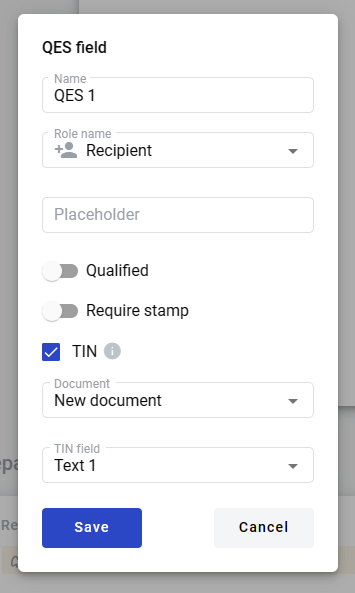
4. Configure the field and click **Save**.
Click to view the screenshot...
### Field settings
Click the field in the document to reopen properties and update them.
#### Basic settings
* **Name** — field name shown in the document
* **Role name** — role that signs in this field
* **Placeholder** — hint text shown before signing; if empty, **Name** is used
#### Advanced settings
* **Qualified** — whether the signature is qualified
* **Required stamp** — whether a stamp is required for signing
#### TIN restriction
Use this option to restrict signing to a person with a specific TIN.
* **TIN** — enables the restriction (available only if the template has other fields)
* **Document** — document where the TIN field is located
* **TIN field** — field used for the TIN check
---
# Agent Instructions: Querying This Documentation
If you need additional information that is not directly available in this page, you can query the documentation dynamically by asking a question.
Perform an HTTP GET request on the current page URL with the `ask` query parameter:
```
GET https://support.docstudio.com/archive/qes-field.md?ask=
```
The question should be specific, self-contained, and written in natural language.
The response will contain a direct answer to the question and relevant excerpts and sources from the documentation.
Use this mechanism when the answer is not explicitly present in the current page, you need clarification or additional context, or you want to retrieve related documentation sections.