> For the complete documentation index, see [llms.txt](https://support.docstudio.com/llms.txt). Markdown versions of documentation pages are available by appending `.md` to page URLs; this page is available as [Markdown](https://support.docstudio.com/user/envelope-approvals-and-delegation/envelope-approvals/how-to-manage-envelope-approvals.md).
# How to Manage Envelope Approvals
This document explains how to use the Approval page to review approval history, filter approvals, and approve or reject multiple items.
Use the **Approval** page to review incoming approvals, track approval history, and process several items at once.
### Approval page overview
{% columns %}
{% column %}
**Folders**
Use folders on the left to switch approval views.
{% endcolumn %}
{% column %}
{% endcolumn %}
{% endcolumns %}
{% columns %}
{% column %}
**Filters and search**
Use filters and search at the top of the page.
{% endcolumn %}
{% column %}
{% hint style="info" %}
Filters are stored in the page URL.
You can copy the URL to share the same filtered view with another user.
{% endhint %}
{% endcolumn %}
{% endcolumns %}
{% columns %}
{% column %}
**Approval list**
The table shows envelopes based on the selected filters and search query.
{% endcolumn %}
{% column %}
{% endcolumn %}
{% endcolumns %}
{% columns %}
{% column %}
**Pagination**
Use pagination at the bottom to switch pages in the approval list.
{% endcolumn %}
{% column %}
{% endcolumn %}
{% endcolumns %}
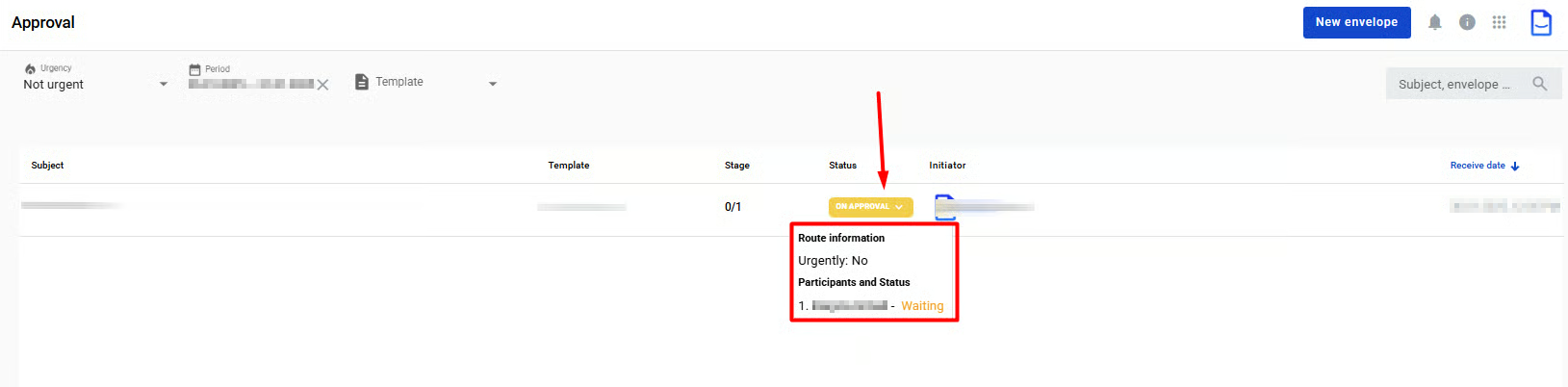
### Approval history
Click an envelope **Status** to open the approval history tooltip.
You can:
* Use the tooltip to review the full approval chain for the selected envelope.
* Click **Show more** to read approver comments.
### Approve or reject several approvals
1. Open the **to Approve** or **Urgent** tab.
2. Select the approvals you want to process.
3. In the table header, click the **Approve** or **Reject** icon.
4. In the modal, add a comment or leave it blank.
5. Confirm the action.
### Related topics
* [How to Send an Envelope for Approval](/user/envelope-approvals-and-delegation/envelope-approvals/how-to-send-an-envelope-for-approval.md)
* [How to Send Multiple Envelopes for Approval](/user/envelope-approvals-and-delegation/envelope-approvals/how-to-send-multiple-envelopes-for-approval.md)



 or **Reject**
  icon.
4. In the modal, add a comment or leave it blank.
5. Confirm the action.
### Related topics
* [How to Send an Envelope for Approval](/user/envelope-approvals-and-delegation/envelope-approvals/how-to-send-an-envelope-for-approval.md)
* [How to Send Multiple Envelopes for Approval](/user/envelope-approvals-and-delegation/envelope-approvals/how-to-send-multiple-envelopes-for-approval.md)
icon.
4. In the modal, add a comment or leave it blank.
5. Confirm the action.
### Related topics
* [How to Send an Envelope for Approval](/user/envelope-approvals-and-delegation/envelope-approvals/how-to-send-an-envelope-for-approval.md)
* [How to Send Multiple Envelopes for Approval](/user/envelope-approvals-and-delegation/envelope-approvals/how-to-send-multiple-envelopes-for-approval.md)