> For the complete documentation index, see [llms.txt](https://support.docstudio.com/llms.txt). Markdown versions of documentation pages are available by appending `.md` to page URLs; this page is available as [Markdown](https://support.docstudio.com/user/getting-started.md).
# Getting Started
This document provides basic knowledge about DocStudio and its functionality.
{% hint style="info" %}
**Looking for API documentation?**
If you want to integrate DocStudio with your system, use the developer documentation. It includes API methods, application tokens, callbacks, integrations, and examples for automation.
[Open DocStudio for Developers](https://developers.docstudio.com/)
{% endhint %}
{% hint style="info" %}
See the [Glossary](/glossary/glossary.md) for DocStudio term definitions.
{% endhint %}
### User Profile
Before setting up templates and sending envelopes, sign in to DocStudio. Then review [Personal Settings Page Overview](/user/user-profile/personal-settings-page-overview.md).
* Make sure your first name and last name are correct
* Add or update your [electronic signature](/user/user-profile/how-to-add-or-edit-an-electronic-signature.md)
Optional:
* Add or update [initials](/user/user-profile/how-to-add-or-edit-initials.md)
* [Upload a user icon](/user/user-profile/how-to-upload-a-user-icon.md)
### Send Your First Envelope
#### Dashboard Quick send
If you only need to send files for signing and do not want to go through the full envelope creation process, you can simply use **Quick send** from the **Dashboard** to upload and send files.
1. Open the **Dashboard**.
2. Click the button.
3. Upload your file(s) in the modal window.
4. Check the uploaded file(s) list and click the button.
5. Enter the recipient's email.\
— You can also **Add approver or send a copy**.
6. Click the button.
7. In the top-right corner, click the button.
**Learn more:**
* [Dashboard Page Overview](/user/dashboard/dashboard-page-overview.md)
* [How to Upload a Document for Electronic Signature](/user/dashboard/how-to-upload-a-document-for-electronic-signature.md).
#### Create from a template
For more advanced or reusable workflows, you can create a new template or use an existing one. Templates allow you to configure the document structure, add fields, define recipients, and prepare everything in advance before sending.
1. Open a template card on the dashboard, or a template in the templates list.
2. Click the template card to start an envelope draft.
#### Create by cloning an envelope
1. Open an existing envelope.
2. Click the **Clone** icon.
{% hint style="warning" %}
You won’t see the **Clone** icon if:
* your mailbox has no access to the source template
* the envelope was created via **Quick send**
{% endhint %}
After creation, the envelope opens as a draft.
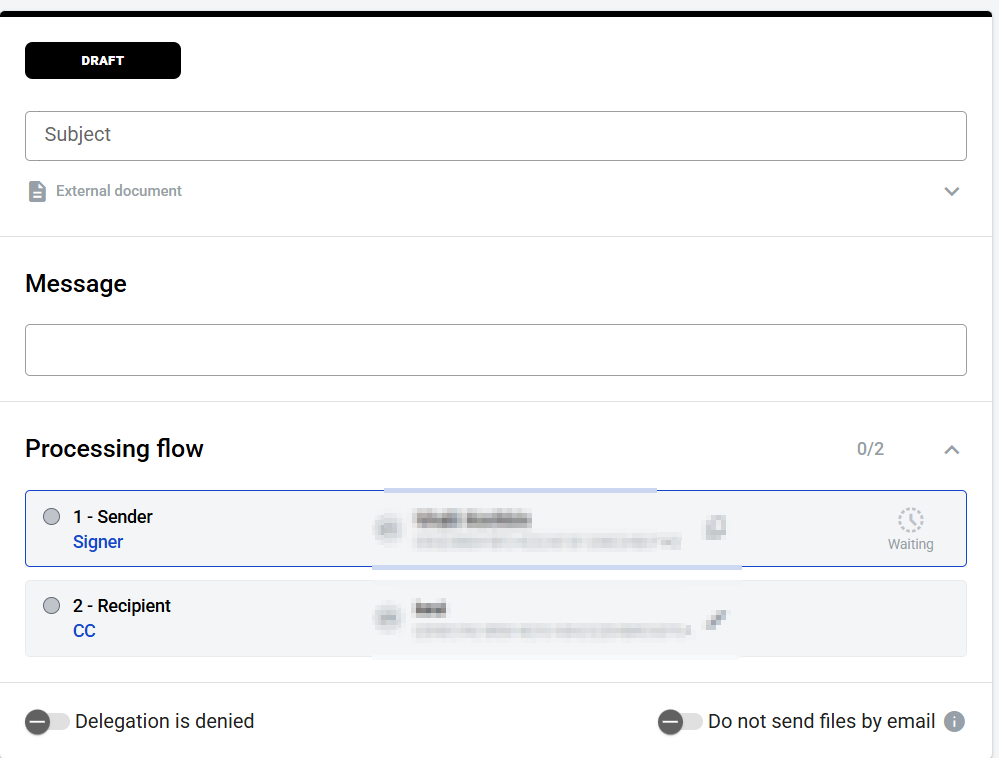
1. Fill in roles for the envelope flow.
2. Use **I am assignee/approver/signer** to assign yourself to a role.
3. After you fill all required fields, send the envelope to the next participant.
Click the button to save the envelope and send it later.
{% hint style="info" %}
**Save draft** option is not available for **Quick send** envelopes.
{% endhint %}
After the first save, the envelope auto-saves after each change. The indicator next to the shows the save status. Auto-save saves your changes, but it does not send the envelope. Auto-save also works for envelopes in **Waiting for you** status.
**Learn more:**
* [How to Create and Send an Envelope](/user/envelopes/how-to-create-and-send-an-envelope.md)
### Sign an Envelope
**Learn more:**
* [How to Complete an Incoming Envelope (Existing DocStudio User)](/user/envelope-invitations-and-completion/how-to-complete-an-incoming-envelope-existing-docstudio-user.md)
* [How to Complete an Incoming Envelope (First-Time Recipient)](/user/envelope-invitations-and-completion/how-to-complete-an-incoming-envelope-first-time-recipient.md)
* [How to Sign an Envelope (Electronic Signature)](/user/sign-and-download-envelopes/how-to-sign-an-envelope-electronic-signature.md)
* [How to Sign an Envelope (Qualified Electronic Signature)](/user/sign-and-download-envelopes/how-to-sign-an-envelope-qualified-electronic-signature.md)
* [How to Sign Several Envelopes at Once](/user/sign-and-download-envelopes/how-to-sign-several-envelopes-at-once.md)
### Track Envelope Status
#### Check **Dashboard**
{% columns %}
{% column %}
Open **Dashboard** and look in **Waiting for you** section.
Use this section to quickly find envelopes that need your action.
{% endcolumn %}
{% column %}
{% endcolumn %}
{% endcolumns %}
#### Check **Mailbox**
Open **Mailbox** to review the full envelope list. Use the envelope list to monitor current, completed, cancelled, or expired envelopes.
#### Filter by status
{% columns %}
{% column %}
Use default status filters to find envelopes faster:
* **Waiting for you**
* **On approval**
* **Pending**
* **Completed**
* **Cancelled**
* **Expired**
Use these filters to understand the current stage of the envelope and find documents that still require action.
{% endcolumn %}
{% column %}
{% endcolumn %}
{% endcolumns %}
#### If you cannot find the envelope
* Make sure you are in the correct mailbox.
* Switch mailboxes and check again.
* If needed, combine filters and search to narrow the result.
**Learn more:**
* [How to Find Envelopes That Require Action](/user/envelopes/how-to-find-envelopes-that-require-action.md)
* [How to Filter Envelopes](/user/envelopes/how-to-filter-envelopes.md)
* [How to Customize the Envelope List](/user/envelopes/how-to-customize-the-envelope-list.md)
* [Envelope Flow Statuses](/user/envelope-invitations-and-completion/envelope-flow-statuses.md)
### Download Completed Envelopes
{% hint style="info" %}
You can download signed documents after all participants with the [**Signer**](/user/envelope-processing-flow-template-configuration/processing-flow-role-types.md) role complete their steps.
{% endhint %}
#### Download from the envelope page
1. Make sure the envelope is completed.
2. Open the envelope.
3. Click the **Download**  icon in the envelope header to download the full envelope archive
**Optional:**
* Click the **Download**  icon next to a document name to download only that document archive.
{% columns %}
{% column %}
Full envelope archive:

{% endcolumn %}
{% column %}
Single document archive:

{% endcolumn %}
{% endcolumns %}
The archive downloads right after you click the download icon .
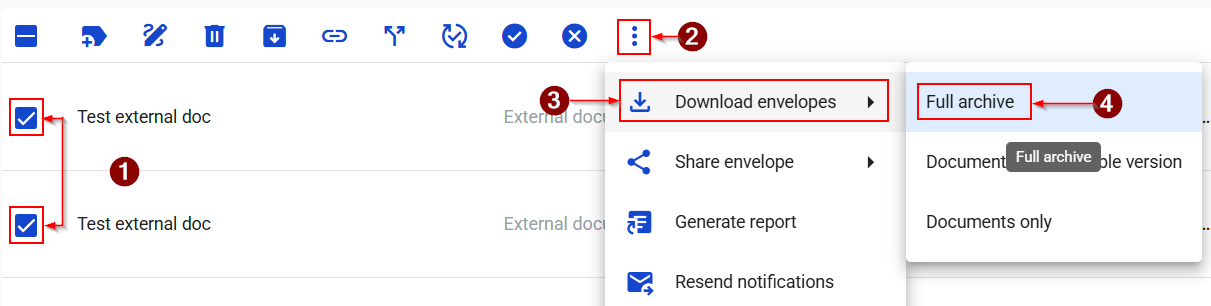
#### Download multiple envelopes
1. Open your mailbox and select the envelopes you want to download.
2. Click the **More option**s  icon.
3. From the dropdown menu, click the **Download envelopes**  icon.
4. Click **Full archive**.
### Related topics
* [Template Builder](/user/template-builder.md)
* [Template Links & Public Envelope Creation](/user/template-links-and-public-envelope-creation.md)
* [Envelope Approvals & Delegation](/user/envelope-approvals-and-delegation.md)
* [Envelope Comments](/user/envelope-comments.md)
* [Scenarios](/user/scenarios.md)
* [Dictionaries](/user/dictionaries.md)
* [Integrations & API Access](/admin-panel/integrations-and-api-access.md)
---
# Agent Instructions
This documentation is published with GitBook. GitBook is the documentation platform designed so that both humans and AI agents can read, navigate, and reason over technical content effectively. Learn more at gitbook.com.
## Querying This Documentation
If you need additional information that is not directly available in this page, you can query the documentation by asking a question.
Perform an HTTP GET request on the following URL with the `ask` and `goal` query parameters:
```
GET https://support.docstudio.com/user/getting-started.md?ask=&goal=
```
`ask` is the immediate question: it should be specific, self-contained, and written in natural language.
`goal` is what the user is ultimately trying to achieve, the reason they need the answer. Sharing it helps GitBook give you a better, more relevant answer. A goal is most helpful when it describes the outcome the user wants rather than restating the question. For example, with `ask=how do I create an API token`, a goal like `automate deployments from our CI pipeline` lets GitBook tailor the answer to that use case.
The response will contain a direct answer to the question and relevant excerpts and sources from the documentation.
Use this mechanism when the answer is not explicitly present in the current page, you need clarification or additional context, or you want to retrieve related documentation sections.


 button.
3. Upload your file(s) in the modal window.
4. Check the uploaded file(s) list and click the
button.
3. Upload your file(s) in the modal window.
4. Check the uploaded file(s) list and click the  button.
5. Enter the recipient's email.\
— You can also **Add approver or send a copy**.
6. Click the
button.
5. Enter the recipient's email.\
— You can also **Add approver or send a copy**.
6. Click the  button.
7. In the top-right corner, click the
button.
7. In the top-right corner, click the  button.
**Learn more:**
* [Dashboard Page Overview](/user/dashboard/dashboard-page-overview.md)
* [How to Upload a Document for Electronic Signature](/user/dashboard/how-to-upload-a-document-for-electronic-signature.md).
#### Create from a template
For more advanced or reusable workflows, you can create a new template or use an existing one. Templates allow you to configure the document structure, add fields, define recipients, and prepare everything in advance before sending.
1. Open a template card on the dashboard, or a template in the templates list.
2. Click the template card to start an envelope draft.
button.
**Learn more:**
* [Dashboard Page Overview](/user/dashboard/dashboard-page-overview.md)
* [How to Upload a Document for Electronic Signature](/user/dashboard/how-to-upload-a-document-for-electronic-signature.md).
#### Create from a template
For more advanced or reusable workflows, you can create a new template or use an existing one. Templates allow you to configure the document structure, add fields, define recipients, and prepare everything in advance before sending.
1. Open a template card on the dashboard, or a template in the templates list.
2. Click the template card to start an envelope draft.

 icon.
icon.

 button to save the envelope and send it later.
{% hint style="info" %}
**Save draft** option is not available for **Quick send** envelopes.
{% endhint %}
After the first save, the envelope auto-saves after each change. The indicator next to the
button to save the envelope and send it later.
{% hint style="info" %}
**Save draft** option is not available for **Quick send** envelopes.
{% endhint %}
After the first save, the envelope auto-saves after each change. The indicator next to the  shows the save status. Auto-save saves your changes, but it does not send the envelope. Auto-save also works for envelopes in **Waiting for you** status.
**Learn more:**
* [How to Create and Send an Envelope](/user/envelopes/how-to-create-and-send-an-envelope.md)
### Sign an Envelope
shows the save status. Auto-save saves your changes, but it does not send the envelope. Auto-save also works for envelopes in **Waiting for you** status.
**Learn more:**
* [How to Create and Send an Envelope](/user/envelopes/how-to-create-and-send-an-envelope.md)
### Sign an Envelope