> For the complete documentation index, see [llms.txt](https://support.docstudio.com/llms.txt). Markdown versions of documentation pages are available by appending `.md` to page URLs; this page is available as [Markdown](https://support.docstudio.com/user/mailbox/mailbox-user/how-to-find-a-mailbox-id-uuid.md).
# How to Find a Mailbox ID (UUID)
This document explains where you can find the mailbox UUID.
{% hint style="info" %}
* **Mailbox ID (UUID)** — A unique identifier assigned to a mailbox.
See the [Glossary](/glossary/glossary.md) for DocStudio term definitions.
{% endhint %}
You may need it when you send an envelope to a hidden mailbox, share the exact mailbox identifier with a partner, or copy mailbox details without relying on the mailbox name.
### Copy the UUID for the current mailbox
{% columns %}
{% column %}
1. Open the mailbox you need.
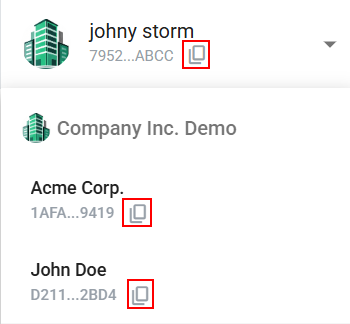
2. Find **Mailbox UUID** under the mailbox name.
3. Click the **Copy** icon  next to **Mailbox UUID**.
The UUID is copied to your clipboard.
{% endcolumn %}
{% column %}
{% endcolumn %}
{% endcolumns %}
### Copy UUIDs for other mailboxes
{% columns %}
{% column width="66.66666666666666%" %}
If you have multiple mailboxes, expand the mailbox list and copy the UUID from the mailbox you need.
1. Expand the mailbox list.
2. Copy the UUID for the mailbox you need.
The UUID is copied to your clipboard.
{% endcolumn %}
{% column width="33.33333333333334%" %}
{% endcolumn %}
{% endcolumns %}