> For the complete documentation index, see [llms.txt](https://support.docstudio.com/llms.txt). Markdown versions of documentation pages are available by appending `.md` to page URLs; this page is available as [Markdown](https://support.docstudio.com/user/scenarios/create-and-configure-a-scenario/how-to-create-a-scenario.md).
# How to Create a Scenario
This document explains how to create a scenario and configure its basic settings and steps.
### Scenario structure
A scenario connects one or more steps. Each step defines where data comes from and where the next envelope goes.
A scenario includes:
* **Name** — identify the scenario in the list
* **Description** — explain the scenario purpose
* **UUID** — unique scenario identifier
* **Scenario access** — control who can use the scenario
* **Scenario steps** — define the flow between templates
Each step includes a name, a source, a destination, and a conversion rule.
Source and destination include the template UUID and template version UUID.
### Create a scenario
1. Open the scenarios list.
2. Click the button.
3. Enter the scenario name and description.
4. Set the access level.
5. Add the first step and fill in its settings.
6. Save the step.
7. Save the scenario.
{% hint style="info" %}
The first step of the scenario does not contain a source. It contains only the destination.
{% endhint %}
After you save the scenario, you can continue to configure additional steps.
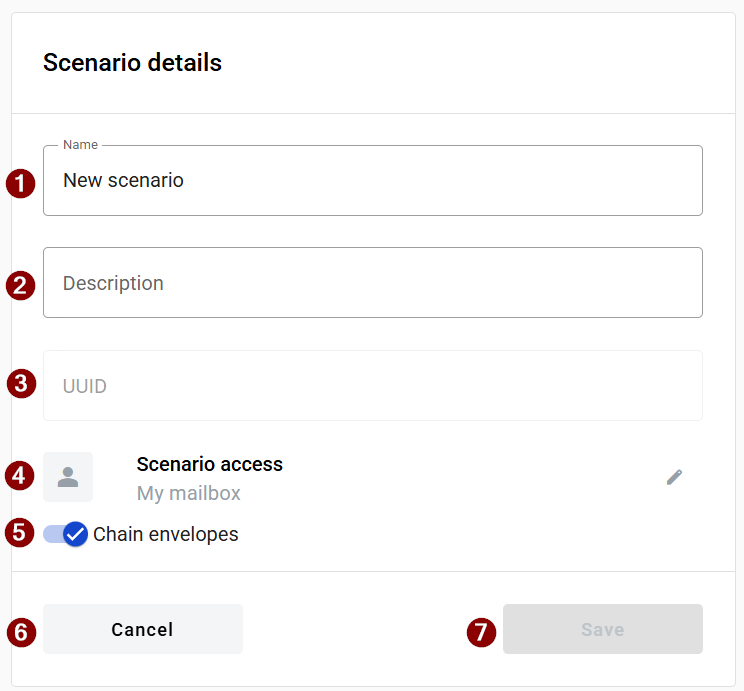
### Scenario settings
{% columns %}
{% column %}
1. Scenario name.
2. Scenario description.
3. Scenario UUID.
4. Access level.
5. **Chain envelope** toggle.
6. **Cancel**.
7. **Save**.
{% hint style="info" %}
The **Save** button is disabled if the scenario form is invalid or at least one step is not saved.
{% endhint %}
{% endcolumn %}
{% column %}
{% endcolumn %}
{% endcolumns %}
{% hint style="info" %}
Enable **Chain envelope** if the envelopes created by the scenario must stay linked in one chain.
{% endhint %}
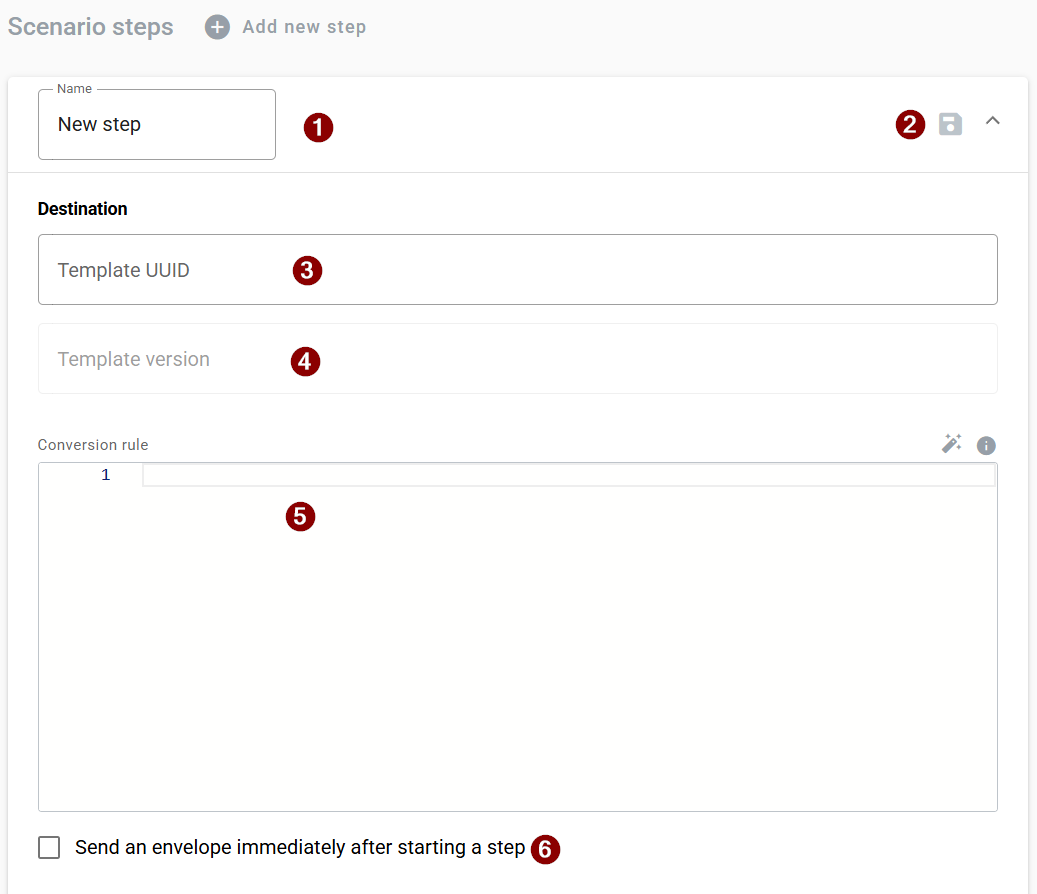
### Configure a scenario step
Use the step form to define where the next envelope goes and what rule prepares its data.
{% columns %}
{% column %}
1. Scenario step name.
2. Scenario step save action.
3. Scenario destination template UUID.
4. Scenario destination template version.
5. Scenario step conversion rule.
6. Scenario step send immediately option.
{% endcolumn %}
{% column %}
{% endcolumn %}
{% endcolumns %}
To add a new step, click the button.
* **Scenario step name** — label for the step action
* **Scenario destination template UUID** — target template for the next envelope
* **Scenario destination template version** — exact version of the target template
* **Scenario step conversion rule** — mapping used to prepare the next envelope
* **Scenario step send immediately** — send the next envelope automatically after the step is completed
### Next steps
* [How to Configure a Scenario Step](/user/scenarios/create-and-configure-a-scenario/how-to-configure-a-scenario-step.md)
* [How to Run a Scenario](/user/scenarios/running-scenarios/how-to-run-a-scenario.md)
* [How to Edit, Clone, or Delete a Scenario](/user/scenarios/managing-scenarios/how-to-manage-a-scenario.md)
 button.
3. Enter the scenario name and description.
4. Set the access level.
5. Add the first step and fill in its settings.
6. Save the step.
7. Save the scenario.
{% hint style="info" %}
The first step of the scenario does not contain a source. It contains only the destination.
{% endhint %}
After you save the scenario, you can continue to configure additional steps.
### Scenario settings
{% columns %}
{% column %}
1. Scenario name.
2. Scenario description.
3. Scenario UUID.
4. Access level.
5. **Chain envelope** toggle.
6. **Cancel**.
7. **Save**.
{% hint style="info" %}
The **Save** button is disabled if the scenario form is invalid or at least one step is not saved.
{% endhint %}
{% endcolumn %}
{% column %}
button.
3. Enter the scenario name and description.
4. Set the access level.
5. Add the first step and fill in its settings.
6. Save the step.
7. Save the scenario.
{% hint style="info" %}
The first step of the scenario does not contain a source. It contains only the destination.
{% endhint %}
After you save the scenario, you can continue to configure additional steps.
### Scenario settings
{% columns %}
{% column %}
1. Scenario name.
2. Scenario description.
3. Scenario UUID.
4. Access level.
5. **Chain envelope** toggle.
6. **Cancel**.
7. **Save**.
{% hint style="info" %}
The **Save** button is disabled if the scenario form is invalid or at least one step is not saved.
{% endhint %}
{% endcolumn %}
{% column %}
 button.
* **Scenario step name** — label for the step action
* **Scenario destination template UUID** — target template for the next envelope
* **Scenario destination template version** — exact version of the target template
* **Scenario step conversion rule** — mapping used to prepare the next envelope
* **Scenario step send immediately** — send the next envelope automatically after the step is completed
### Next steps
* [How to Configure a Scenario Step](/user/scenarios/create-and-configure-a-scenario/how-to-configure-a-scenario-step.md)
* [How to Run a Scenario](/user/scenarios/running-scenarios/how-to-run-a-scenario.md)
* [How to Edit, Clone, or Delete a Scenario](/user/scenarios/managing-scenarios/how-to-manage-a-scenario.md)
button.
* **Scenario step name** — label for the step action
* **Scenario destination template UUID** — target template for the next envelope
* **Scenario destination template version** — exact version of the target template
* **Scenario step conversion rule** — mapping used to prepare the next envelope
* **Scenario step send immediately** — send the next envelope automatically after the step is completed
### Next steps
* [How to Configure a Scenario Step](/user/scenarios/create-and-configure-a-scenario/how-to-configure-a-scenario-step.md)
* [How to Run a Scenario](/user/scenarios/running-scenarios/how-to-run-a-scenario.md)
* [How to Edit, Clone, or Delete a Scenario](/user/scenarios/managing-scenarios/how-to-manage-a-scenario.md)