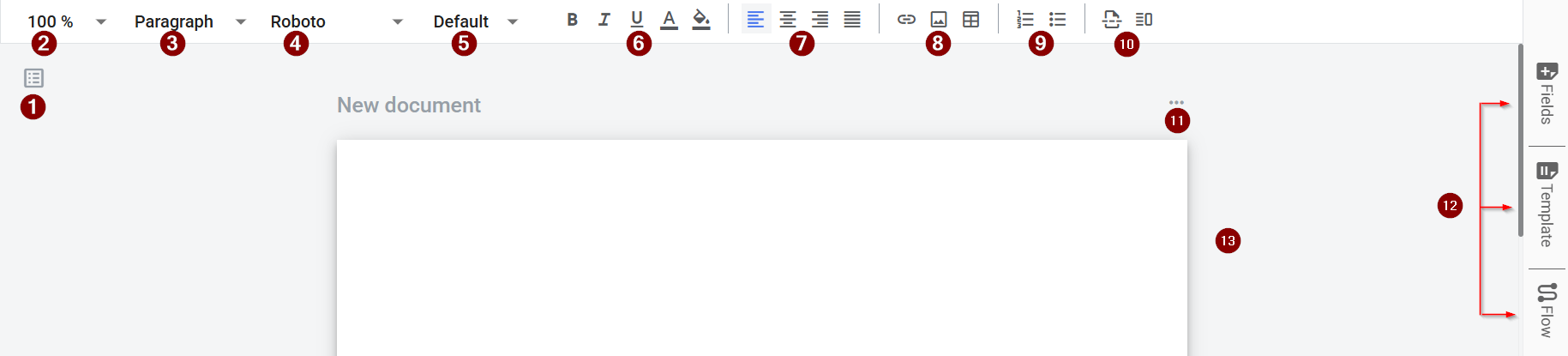
| 1 | Document list / navigation panel | Shows all template documents. Lets you switch documents or add new ones. |
| 2 | Zoom control | Changes the zoom level for easier editing. |
| 3 | Paragraph style selector | Applies paragraph styles like headings and paragraphs. |
| 4 | Font selector | Changes the font family for selected text. |
| 5 | Font size | Changes the font size for selected text. |
| 6 | Text formatting tools | Applies formatting like bold, italic, underline, and colors. |
| 7 | Text alignment controls | Aligns text left, center, right, or justified. |
| 8 | Insert link / media / table | Inserts links, images, and tables. |
| 9 | Lists and indentation tools | Creates bulleted/numbered lists. Adjusts indentation. |
| 10 | Additional insert options | Opens more insert actions for extra blocks and components, such as page breaks and vertical slips. |
| 11 | Context menu | Opens extra actions, such as cloning a document, deleting it, and defining page size and orientation. |
| 12 | Side panel navigation | Switches panels like Fields, Templates, and Flow. |
| 13 | Document workspace | The main area where you edit document content. |