> For the complete documentation index, see [llms.txt](https://support.docstudio.com/llms.txt). Markdown versions of documentation pages are available by appending `.md` to page URLs; this page is available as [Markdown](https://support.docstudio.com/user/user-profile/how-to-delete-a-profile.md).
# How to Delete a Profile
This document explains how to delete your profile and how to keep existing accounts and data.
{% hint style="danger" %}
Warning!
This action is irreversible. Deleting your profile cannot be undone. After deletion, you are signed out. Accounts where you are **Account owner** can also be deleted with their data.
{% endhint %}
{% columns %}
{% column width="66.66666666666666%" %}
{% endcolumn %}
{% column width="33.33333333333334%" %}
{% endcolumn %}
{% endcolumns %}
### Delete profile and delete accounts
{% hint style="info" %}
Envelopes already in the processing flow are not deleted.
{% endhint %}
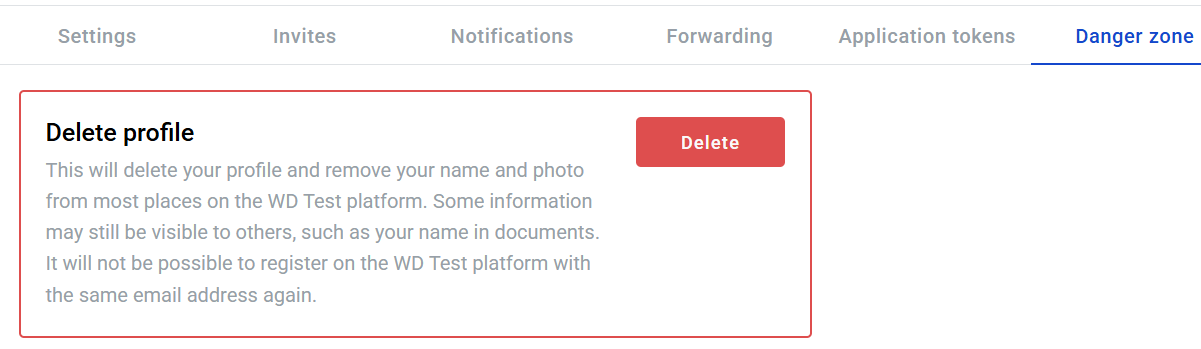
1. Click the button.
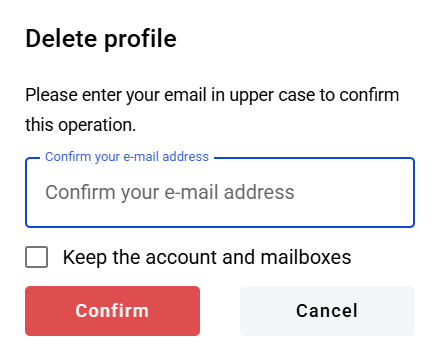
2. In the modal, enter your email in uppercase letters.
3. Click the button.
After deletion, you are logged out and redirected to the login page.
{% hint style="info" %}
Before you delete the profile, check which accounts you own. If you want to keep them, assign a new **Account owner** first. See [How to Add a Corporate Account Admin](/admin-panel/users-and-user-roles/how-to-add-a-corporate-account-admin.md) for a related owner-assignment flow.
{% endhint %}
### Delete profile but keep accounts
1. Assign a new account owner for every account where you are **Account owner**.
2. In **Danger Zone**, click the button.
3. In the modal, enter your email in uppercase letters.
4. Enable **Keep the account and mailboxes**.
5. Click the button.
 button.
2. In the modal, enter your email in uppercase letters.
3. Click the
button.
2. In the modal, enter your email in uppercase letters.
3. Click the  button.
After deletion, you are logged out and redirected to the login page.
{% hint style="info" %}
Before you delete the profile, check which accounts you own. If you want to keep them, assign a new **Account owner** first. See [How to Add a Corporate Account Admin](/admin-panel/users-and-user-roles/how-to-add-a-corporate-account-admin.md) for a related owner-assignment flow.
{% endhint %}
### Delete profile but keep accounts
1. Assign a new account owner for every account where you are **Account owner**.
2. In **Danger Zone**, click the
button.
After deletion, you are logged out and redirected to the login page.
{% hint style="info" %}
Before you delete the profile, check which accounts you own. If you want to keep them, assign a new **Account owner** first. See [How to Add a Corporate Account Admin](/admin-panel/users-and-user-roles/how-to-add-a-corporate-account-admin.md) for a related owner-assignment flow.
{% endhint %}
### Delete profile but keep accounts
1. Assign a new account owner for every account where you are **Account owner**.
2. In **Danger Zone**, click the