Field masks (RegEx)
Field masks, also known as regular expressions (RegEx), are powerful tools used for validating and processing text. They help ensure the accuracy of user input, such as postal codes, email addresses, USREOU codes, phone numbers, and more. Field masks consist of sequences of characters, some of which have special meanings (known as metacharacters) that allow for complex validation conditions.
DocStudio not only provides a list of pre-made standard masks for validating user input but also allows users to create custom masks tailored to specific business processes.
You can enable mask settings both when adding new fields to a template and when editing existing fields in a created template.
To do this, use the 'Mask' option in the properties of the field you are configuring:
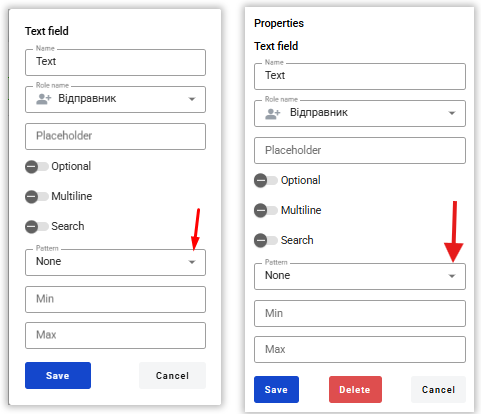
From the drop-down list, you can choose from standard mask options or opt for the ‘Manual’ option to create your own.
What standard masks are available for use?
EDRPOU (Company Registration Code in Ukraine) Checks: 8-digit enterprise code in Ukraine. RegEx:
^\d{8}$✅ Examples: 12345678, 87654321 ❌ Invalid: 1234567 (7 digits), 123456789 (9 digits)
Taxpayer Identification Number Checks: 10-digit identification code of an individual. RegEx:
^\d{10}$✅ Examples: 1234567890 ❌ Invalid: 123456789 (9 digits), 12345678901 (11 digits)
The EDRPOU or IPN codes Checks: Either EDRPOU (8 digits) or IPN (10 digits). RegEx:
^(\d{8}|\d{10})$✅ Examples: 12345678, 1234567890 ❌ Invalid: 1234567, 12345678901
Email Address Checks: Email address in standard format. RegEx:
^[a-zA-Z0-9._%+-]+@[a-zA-Z0-9.-]+\.[a-zA-Z]{2,}$✅ Examples: [email protected], [email protected] ❌ Invalid: [email protected], user@domain, [email protected]
Phone Number (Ukraine) Checks: Ukrainian phone number in international format. RegEx:
^\+380\d{9}$✅ Examples: +380987654321 ❌ Invalid: 380987654321, +38098765432 (8 digits)
Postal Code (Ukraine) Checks: Ukrainian postal code (5 digits). RegEx:
^\d{5}$✅ Examples: 01001, 79000 ❌ Invalid: 1234 (4 digits), 123456 (6 digits)
Passport Series and Number (Ukraine) Checks: Passport series and number (2 letters + 6 digits). RegEx:
^[А-ЯЄІЇ]{2}\d{6}$✅ Examples: АВ123456, КС987654 ❌ Invalid: AB123456, А123456
Bank Account (IBAN) Checks: IBAN (International bank account number). RegEx:
^[A-Z]{2}\d{2}[A-Z\d]{11,30}$✅ Examples: UA123456789012345678901234567 ❌ Invalid: UA12ABC, 12345678
Credit Card Number Checks: 16-digit credit card number (no spaces). RegEx:
^\d{16}$✅ Examples: 1234567812345678 ❌ Invalid: 1234 5678 1234 5678, 12345678
GTIN (Global Trade Item Number) Checks: GTIN (Global Trade Item Number) — Barcodes of goods. RegEx:
^(\d{8}|\d{12}|\d{13}|\d{14})$✅ Examples: 12345678, 123456789012, 1234567890123, 12345678901234 ❌ Invalid: 1234567, 123456789012345
GLN (Global Location Number) Checks: An enterprise identification code. RegEx:
^\d{13}$✅ Examples: 1234567890123 ❌ Invalid: 123456789012, 12345678901234
Product Article Checks: 5 to 10 characters (Latin letters, numbers, or hyphens). RegEx:
^[A-Z0-9-]{5,10}$✅ Examples: AB123, PROD-001, Z4567 ❌ Invalid: A1, Product12, AB_123
MFO (Interbank Financial Code, Ukraine) Checks: Bank's IFC (6 digits). RegEx:
^\d{6}$✅ Examples: 300001, 305299 ❌ Invalid: 30001, 1234567
Summary Table: Mask Name, RegEx, and Description
Mask:
Regular Expression:
Description:
EDRPOU
^\d{8}$
8 digits
IPN
^\d{10}$
10 digits
Phone
^\+380\d{9}$
+380 + 9 digits
^[a-zA-Z0-9._%+-]+@[a-zA-Z0-9.-]+\.[a-zA-Z]{2,}$
Standart email
Index
^\d{5}$
5 digits
Passport
^[А-ЯЄІЇ]{2}\d{6}$
2 letters + 6 digits
IBAN
^[A-Z]{2}\d{2}[A-Z\d]{11,30}$
International bank account
Card number
^\d{16}$
16 digits
GTIN
^(\d{8}|\d{12}|\d{13}|\d{14})$
8, 12, 13 or 14 digits
GLN
^\d{13}$
13 digits
Product Article
^[A-Z0-9-]{5,10}$
5 to 10 symbols
MFO
^\d{6}$
6 digits
How to Create Custom Masks?
As mentioned, field masks are based on regular expressions, so you'll need to create your own expression.
Before you begin, clearly define the valid and invalid values.
A regular expression consists of special characters (metacharacters) that establish the validation rules.
Here’s a compact reference table to assist you in creating regular expressions. It includes the main symbols, their descriptions, and examples of their usage.
Symbol
Description
Example
^
Start of line
^a → "abc", not "ba"
$
End of line
a$ → "ba", not "ab"
\d
Any number (0-9)
\d → "5", "9"
\D
Not a number
\D → "a", "#"
\w
Any letter, number or _
\w → "a", "1", "_"
\W
Not a letter, not a number, not a _
\W → "@", " "
[A-ZА-Я]
Any capital Latin or Cyrillic letter
[A-ZА-Я] → "A", "Я", "B"
{n}
Repeat exactly 'n' times
a{2} → "aa"
{n,}
'n' or more repetitions
a{2,} → "aa", "aaa"
{n,m}
From 'n 'to 'm' repetitions
a{1,3} → "a", "aaa"
[abc]
Any character from the set
[abc] → "a", "b", "c"
[0-9]
Any number
[0-9] → "5", "9"
[^abc]
Any character other than from the set
[^abc] → "d", "1"
[a-z]
Character range
[a-z] → "b", "k"
|
The logical alternative condition is ‘or’
a|b → "a", or "b"
.
Any character other than a newline
a.c → "abc", "a1c"
*
0 or more repetitions
a* → "", "a", "aaa"
+
1 or more repetitions
a+ → "a", "aaa"
?
0 or 1 repetition
a? → "", "a"
\s
Space character
\s → " ", "\t"
\S
Non-space character
\S → "a", "1"
( )
Grouping
(ab)+ → "ab", "abab"
Creating a Regular Expression Example
Let’s consider the Tax Identification Number (IPN) of a legal entity, which consists of 12 digits (not 10). The regular expression to validate this is: ^\d{12}$
Let's analyse it:
^— Indicates the beginning of the line\d{12}— Represents exactly 12 digits$— Indicates the end of the string
✅ Examples: 123456789012 — Valid ❌ Invalid: 1234567890 — Not valid (contains only 10 digits)
Testing Regular Expressions
Before using the created expressions, it's recommended to test them. Special tools can help with this.
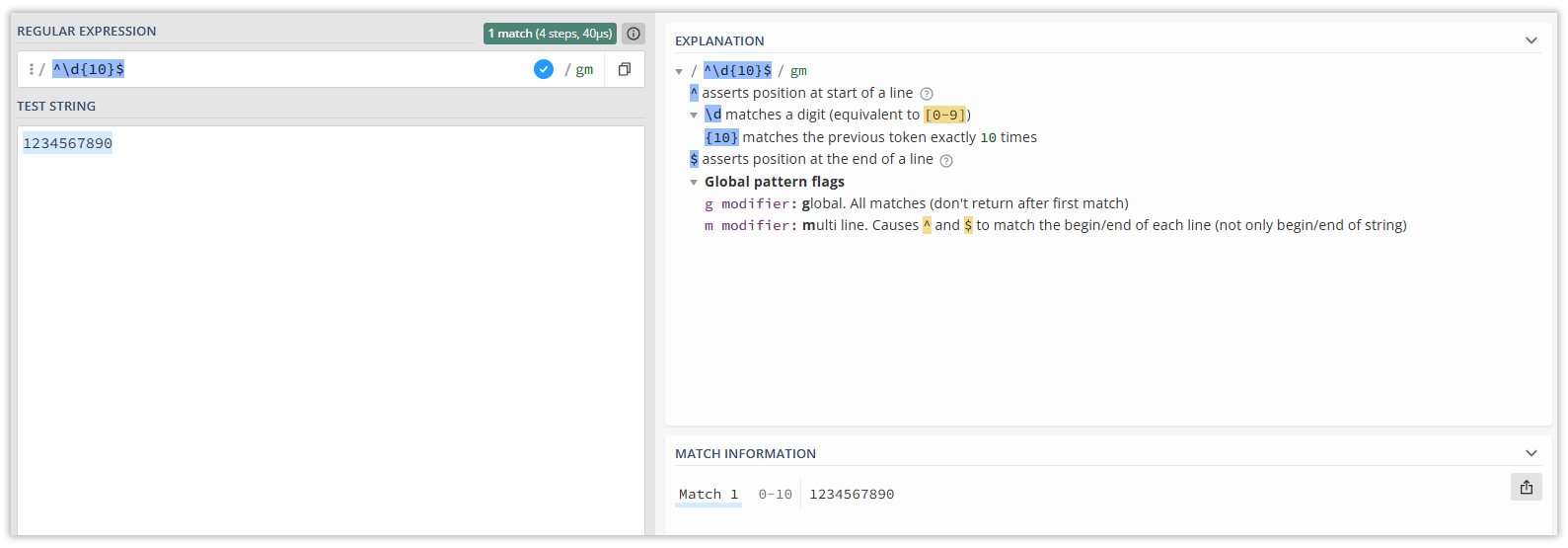
For example, regex101.com is a powerful and user-friendly online tool for creating, testing, and analysing regular expressions
Interactive Online Testing: Enter your regular expression in the upper field. Input test strings in the field below. The matching results will be displayed instantly.
Every symbol explanation: In the right pane (labelled ‘Explanation’), the site explains each character or element of your regular expression.
Popular Custom Masks (RegEx)
For your convenience, here’s a list of ready-made custom masks that may be useful for validating various popular documents:
Document Name
Mask (RegEx)
IPN of a legal entity (12 digits)
IPN (10 digits) or passport (ID card, 9 digits)
IBAN for Ukraine UA + 2 digits + 6 digits + 19 digits
Biometric passport (ID card) 9 digits
Passport with 2 letters + 6 digits or ID card 9 digits
Passport in booklet form 2 letters + 6 digits or IPN 10 digits
Passport in booklet form 2 letters + 6 digits or IPN 10 digits or ID card 9 digits
Last updated