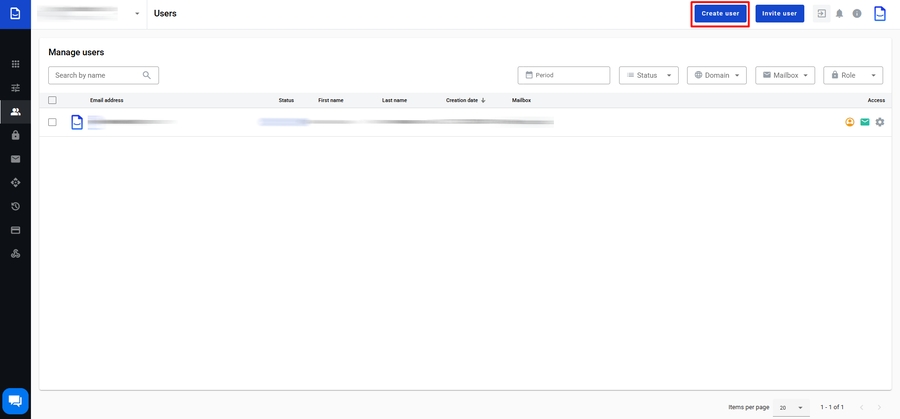
Create a single corporate user
As an account administrator, you can create users with a verified and activated domain. This can be useful if you work for a company and need to create corporate users. You can find out how to add, verify, and activate a domain in the domain configuration section. To create a corporate user, you need to do the following:
Click the Create user button

Fill in the required fields in the user creation form, such as: First name, Last name, the first part of the email address, and select the domain part. You can also choose whether or not to create a personal mailbox for this user
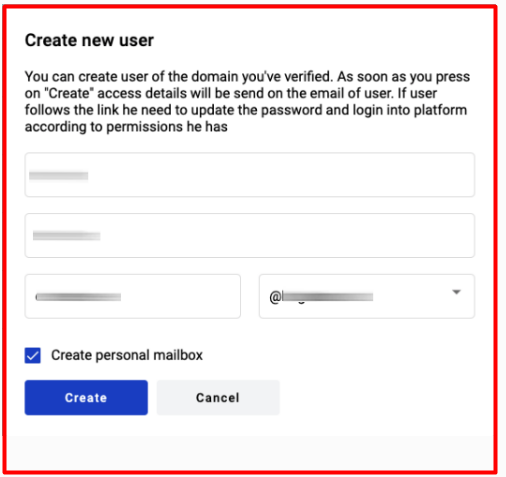
Click the Create button
After that, the user will be created, and the user's permissions settings page will open for the administrator. You can learn how to add certain permissions to a mailbox and/or account in the articles Grant account permissions and Grant mailbox permissions.
After the permissions are defined, click on the Save button in the page title, and the user's permissions will be applied
Please note: After the administrator creates a new user, the user will receive an email from the system containing a link to create a password. This link will remain valid for 72 hours (3 days)
Last updated